Home Smart Classrooms
Smart Classrooms

The Complete Smart Classroom

A Smart Classroom is more than an interactive board — it is a fully integrated ecosystem where teachers, students, devices, and educational software work together seamlessly. This guide covers everything a school head or owner needs to know before investing in smart classroom technology in Zimbabwe.

Interactive Boards Android Tablets Offline Moodle LMS ZIMSEC Ready Cambridge Ready Offline-First
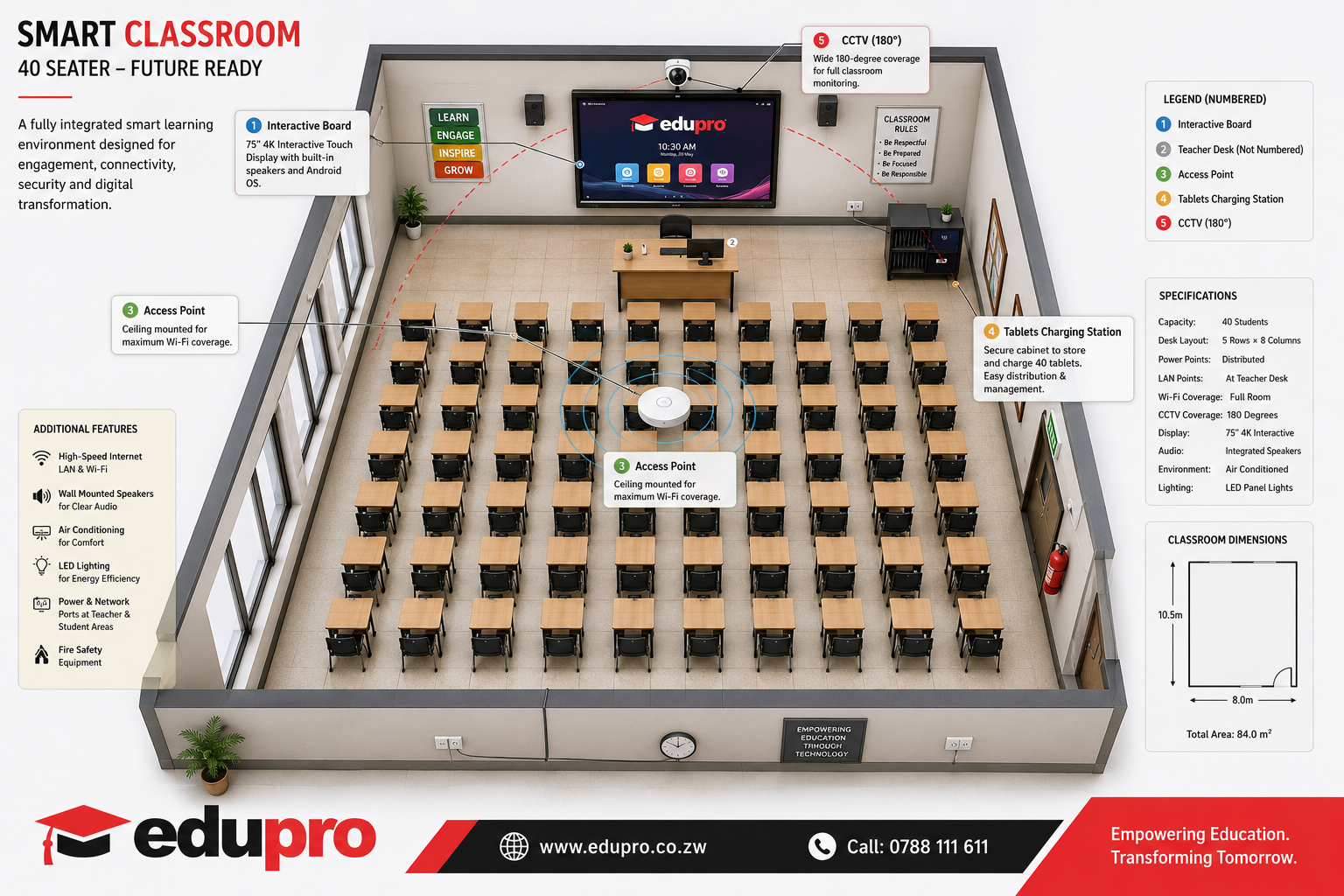
Smart Classroom 3D Floor Plan — Edupro SMS Zimbabwe
3D Floor Plan Smart Classroom Layout — 8m × 10m, 40 learners
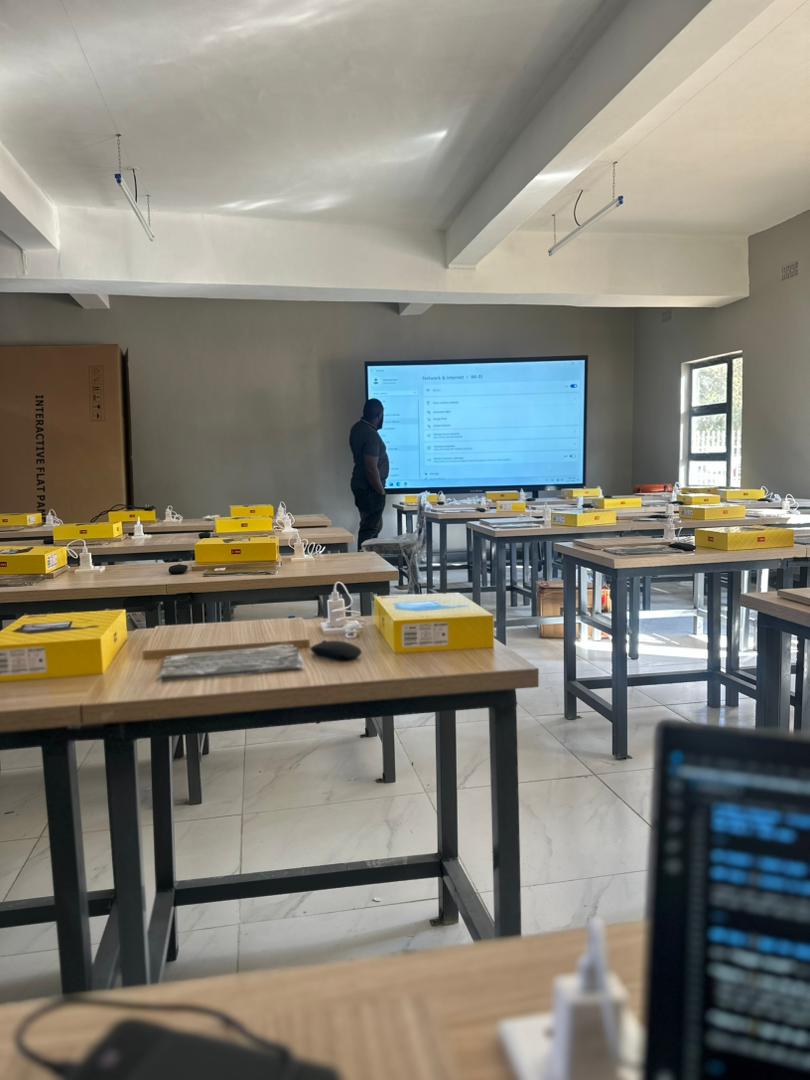
Edupro Smart Classroom — actual installation in a Zimbabwe school
Live Installation Real smart classroom — interactive board, tablets & offline server

What Is a Smart Classroom?

A technology-enabled learning environment that combines interactive teaching tools, digital content, high-speed networking, classroom management, and security — all working together to improve teaching and student results.

Interactive Teaching

Smart boards, 4K displays, and wireless casting replace the chalk board.

Digital Content & LMS

Offline Moodle server with textbooks, videos, quizzes, and past papers.

Student Devices

40 Android tablets with rugged cases, charged and managed centrally.

Secure Networking

Wi-Fi 6 access point, gigabit switch, and Cat6 cabling for every classroom.

Safety & Security

CCTV, MDM device lock, lockable charging cabinet, and fire safety.

Learning Analytics

Track attendance, assignment completion, test scores, and engagement in real time.

1. Classroom Infrastructure & Furniture

The physical space must be designed from the start to support technology. Retrofitting a poorly planned room wastes money.

Room Requirements

  • Minimum size: 8m × 10m, capacity 40 learners
  • Good natural lighting and LED overhead lights
  • Proper ventilation — air conditioning recommended
  • Sound insulation to reduce noise from adjacent rooms
  • Cable trunking and raised power outlets at every desk row
  • Network data points (minimum 6–10 per room)
  • Fire extinguisher, smoke detector, and emergency exit signage

Furniture

  • 40 ergonomic student desks and chairs with book storage
  • Teacher workstation with lockable cabinet
  • Desks designed to accommodate a tablet flat surface
  • Clear sightlines to the interactive board from every seat
  • Aisle spacing for easy teacher movement

2. Interactive Teaching Equipment

The interactive smart board is the centrepiece — but it must be supported by the right teacher hardware to deliver its full value.

Interactive Smart Board

  • Size: 75″–86″ with 4K display
  • Multi-touch with 20+ simultaneous touch points
  • Android OS built-in — runs offline apps without a PC
  • Built-in speakers, HDMI, USB, USB-C, wireless casting
  • Annotation and lesson delivery software included
  • Recommended brands: BenQ, ViewSonic, Hikvision, SMART, Promethean

Teacher Computer & Audio

  • Desktop or laptop: Intel Core i5/i7, 16 GB RAM, 512 GB SSD
  • Wireless keyboard and mouse for freedom of movement
  • Optional dual monitor for preparation and display split
  • Wall-mounted speakers and amplifier
  • Wireless lapel microphone for large classroom coverage
  • HD or PTZ camera for hybrid and recorded lessons

3. Student Devices & Charging

Every learner gets a personal device. Android tablets are the most cost-effective choice for Zimbabwean schools — they work offline, support the Moodle Mobile App, and are easy to manage centrally.

Recommended Tablet Specifications

  • 10-inch display — large enough for reading textbooks
  • 4 GB RAM minimum (8 GB preferred)
  • 64 GB storage for offline content
  • Wi-Fi 5 or Wi-Fi 6, Bluetooth
  • Front camera for video lessons
  • Rugged protective case — essential in a school environment

Alternatives: Windows laptops or Chromebooks where budget allows.

Secure Charging Station

  • Capacity: 40 tablets in one unit
  • Lockable steel doors — tablets are safe overnight
  • Wheels for easy repositioning within the room
  • Smart charging with surge protection
  • Internal ventilation to prevent overheating during charging

4. Wireless Network & Infrastructure

A reliable network is the backbone of the smart classroom. Poor Wi-Fi makes every other investment underperform.

Wi-Fi Access Point

  • Wi-Fi 6 (802.11ax) — supports 100+ devices per AP
  • Dual-band (2.4 GHz and 5 GHz)
  • Ceiling-mounted for even coverage
  • PoE powered — no separate power outlet needed
  • One access point per classroom

School Network

  • Gigabit core switch and patch panel
  • Cat6 cabling throughout the building
  • Fibre backbone between buildings
  • Managed network cabinet with UPS
  • Separate VLANs for students, teachers, and admin

Internet Connection

  • Fibre preferred where available
  • Starlink — practical for rural schools
  • LTE backup to cover outages
  • Note: the classroom works 100% offline without internet — internet is only needed for updates and external resources.

5. Classroom Server, LMS & Software

The local server and Moodle LMS are what make the classroom truly offline-capable — all content, assignments, and assessments run without internet access.

Local Classroom Server

  • Intel Xeon processor, 32 GB RAM, RAID storage
  • Windows Server or Ubuntu Linux
  • Hosts Moodle, digital content library, and backups
  • Shared across multiple classrooms — one server per school
  • Works without internet — content is synced when connectivity is available

Moodle LMS Capabilities

  • Digital notes, assignments, and online tests
  • Automated attendance and gradebook
  • ZIMSEC Heritage-Based Curriculum content pre-loaded
  • Cambridge syllabus materials included
  • Forums, certificates, analytics, and reports
  • Moodle Mobile App for students on tablets

Classroom Management Software

Allows teachers to control all student tablets from the front of the room.

  • View and mirror any student screen in real time
  • Lock screens during exams or when attention is needed
  • Push files and applications to all devices at once
  • Broadcast the teacher screen to all tablets
  • Monitor activity and flag off-task behaviour
  • Examples: Veyon, NetSupport School, ManageEngine

Mobile Device Management (MDM)

Manage all 40 tablets from a central dashboard — no need to touch each device.

  • Install and update apps across all tablets silently
  • Lock devices to approved apps only (kiosk mode)
  • Disable social media and games during school hours
  • Remote wipe if a device is lost or stolen
  • Recommended: Headwind MDM (open source, runs on-premises)

Digital Content Library

6. Security, Safety & Power

Protecting the investment and ensuring the classroom is always operational requires solid power infrastructure and physical security measures.

CCTV Security

  • 180° wide-angle camera per classroom
  • 4 MP minimum — clear facial identification
  • Night vision and motion detection
  • NVR local recording with optional cloud backup
  • Covers the charging cabinet and entry points

Power Infrastructure

  • Dedicated electrical circuit for classroom equipment
  • Surge protection on all power points
  • UPS — keeps server and AP running during load-shedding
  • Backup generator or solar system recommended
  • Power distribution board with labelled breakers

Physical Safety

  • Fire extinguisher and smoke detector
  • First aid kit on wall
  • Emergency lighting and exit signage
  • Secure lockable door with access control
  • Lockable tablet charging cabinet

7. AI, Analytics & Accessibility

Modern smart classrooms go beyond hardware — they use data and AI to personalise learning and give teachers actionable insight.

Artificial Intelligence (AI) Tools

  • Generate lesson plans and quiz questions automatically
  • Auto-mark assignments and short-answer tests
  • Personalise learning paths based on each student's performance
  • Provide AI tutoring assistance for students working independently
  • Translate content into local languages
  • Produce automated progress reports for parents and management

Learning Analytics Dashboard

  • Real-time attendance monitoring per class and subject
  • Assignment submission and completion rates
  • Test and exam scores over time
  • Device usage — which student is on task
  • Teacher performance and lesson delivery metrics
  • Trend reports for school heads and parents

Attendance Automation

Replace paper registers with modern digital check-in options:

QR Code RFID Card NFC Tag Fingerprint Facial Recognition

Accessibility Features

Every learner can participate, regardless of ability:

  • Screen readers and text-to-speech for visually impaired learners
  • Closed captions on all video content
  • Adjustable font sizes and high-contrast display modes
  • Assistive input devices (switch access, large trackball)

Recommended Equipment List

Everything needed for one fully-equipped 40-student smart classroom. Use this as your procurement checklist.

Item Quantity Notes
Interactive Smart Board (75″–86″) 1 BenQ, ViewSonic, SMART, or Promethean
Teacher Desktop or Laptop 1 Core i5/i7, 16 GB RAM, 512 GB SSD
Teacher Desk & Chair 1 With lockable cabinet
Student Desks 40 Ergonomic, tablet-friendly surface
Student Chairs 40
Android Tablets 40 10″, 4 GB RAM, 64 GB storage, rugged case
Tablet Charging Cabinet 1 40-slot, lockable, wheels, surge-protected
Wi-Fi 6 Access Point 1 Ceiling mount, PoE, 100+ device support
24-Port Gigabit Switch 1 Managed, PoE ports
UPS 1 Minimum 1 kVA for server & AP
Classroom Speakers 2 Wall-mounted with amplifier
Wireless Microphone 1 Lapel or handheld
CCTV Camera (180°) 1 4 MP, night vision, PoE
Air Conditioner 1 Inverter type recommended
LED Lighting 8–12 units Energy-efficient, evenly distributed
Cat6 Network Points 6–10 Throughout the room
Fire Extinguisher 1 CO₂ or dry powder
Local Moodle Server 1 per school Shared across all classrooms
Classroom Management Software 1 licence Veyon, NetSupport, or ManageEngine
Mobile Device Management (MDM) 1 deployment Headwind MDM recommended
The Edupro Vision

Smart Classrooms, Built for Zimbabwe

Edupro's fully integrated smart classroom brings together interactive teaching, offline Moodle LMS, Android tablets, Headwind MDM, classroom management software (Veyon or ManageEngine), local AI services, and school management system integration into one scalable solution.

The result is an offline-first smart classroom that runs without internet access, replicates across multiple classrooms and campuses, and integrates attendance, fees, grades, and parent communication into one platform — designed specifically for schools in Zimbabwe.

Offline-First Scalable Across Campuses ZIMSEC & Cambridge Edupro SMS Integrated Local Support, Harare

Ready to Set Up Your Smart Classroom?

Our team in Harare will assess your school, recommend equipment, install everything, train your teachers, and provide ongoing support — all under one contract.

Email Us a Classroom Enquiry WhatsApp Us

91 Lomagundi Road, Avondale, Harare, Zimbabwe